
How to Remove Google Reviews: A Complete 2025 Guide for Businesses
Google reviews actively shape how people perceive your business before they even interact with it. Their perception forms well before they ever consider contacting you — shaped entirely by what others have shared. Companies like FNT Management help businesses ensure this perception is guided by authentic, high-quality feedback.
Here’s how you can navigate the process of removing Google reviews, based on Google's latest moderation guidelines and practical steps that actually work.
Why You Should Care About Google Reviews
Google reviews are directly tied to:
- Local SEO rankings
- Trust and brand perception
- Conversion rates (click-to-call, direction requests, website visits)
Their impact on local search visibility, especially in Google’s Map Pack, is massive. Reviews not only influence how high you rank, but also how likely users are to take the next step — be it calling, booking, or walking into your store.
According to a BrightLocal survey (2024), over 87% of consumers read Google reviews for local businesses. And for many, a single 1-star review can outweigh dozens of good ones, especially if it's unresolved. Businesses with a mix of recent reviews and active responses see significantly higher conversion rates compared to those with outdated or ignored feedback.
Moreover, reviews serve as immediate social proof for undecided customers that influence decision-making at every stage of the buyer journey. A consistent stream of authentic, positive feedback improves click-through rates, reduces bounce, and increases user engagement — all of which indirectly support SEO.
From a branding standpoint, how your business responds to reviews shows your values. Do you engage constructively, or ignore feedback? Prospects notice. That’s why modern review management isn’t just reputation control — it’s an integral part of customer experience and digital visibility.
If you’re working with a trusted Digital Marketing Agency, they’ll typically incorporate review strategy into your broader local SEO campaigns, helping you build stronger, trust-driven profiles that convert better.
Can You Delete a Google Review?
Short answer: Not directly — unless it violates Google’s content policy.
Google's review system is designed to preserve real customer experiences - even if they’re negative reviews online. In practice, this means businesses can’t simply erase criticism. But when a review violates clear platform policies, it becomes eligible for Google review removal - allowing you to dispute and potentially delete harmful feedback.:
- Unfortunately, disliking a review isn’t a valid reason for its removal - even if it feels unfair.
- If the review breaks the rules, you have grounds to act and remove bad Google reviews without violating policy.
Reviews eligible for removal include:
- Fake reviews (from bots, competitors, or spam accounts)
- Off-topic content (e.g., reviewing the wrong business)
- Hate speech or personal attacks
- Sexually explicit or violent content
- Promotional content (self-promotion or irrelevant links)
- Conflict of interest (e.g., ex-employees or incentivized reviews)
To determine whether a review crosses the line, Google relies on its prohibited and restricted content policy. This includes clear definitions of misleading behavior, impersonation, harassment, or content posted with a deceptive or malicious intent.
If a review is flagged for violating these rules, it enters a moderation queue where a Google team assesses context, language, account behavior, and review history. While there’s no guarantee of removal, consistent flagging by multiple users and well-documented reporting increases your chances.
If a review breaks the rules, you have grounds to act. Otherwise, your focus should shift toward damage control — not deletion
Step-by-Step: How to Report and Remove a Google Review
Removing a review from Google isn’t instant — but the process is straightforward if you follow the right steps. Whether you're dealing with spam, fake content, or a clear policy violation, this guide outlines exactly how to flag and request removal within your Google Business Profile dashboard. If you've ever wondered how to delete a review on Google that’s harming your reputation unfairly, here’s exactly what to do:
1. Log into Your Google Business Profile (GBP)
Go to https://business.google.com/ and log in using the Google account tied to your business listing.
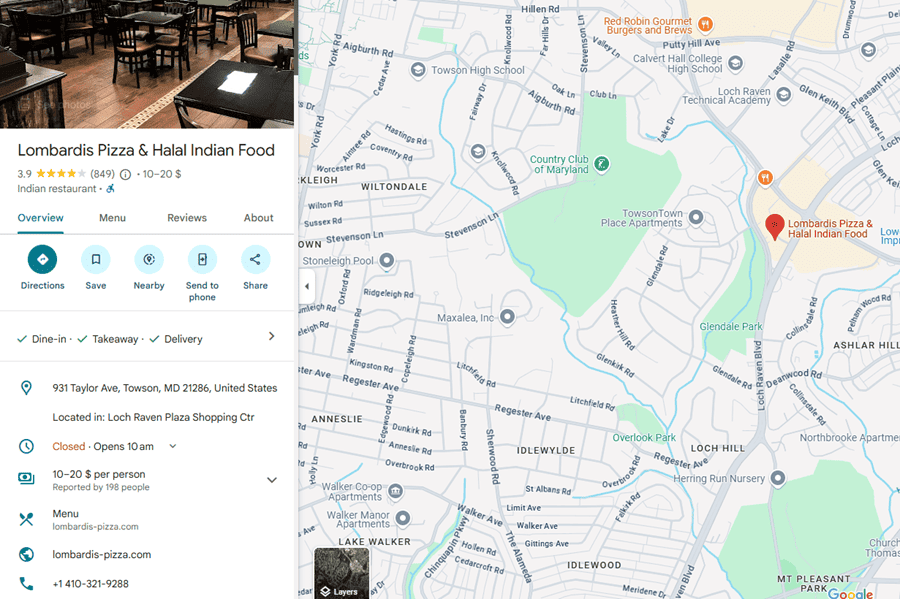
2. Navigate to the Reviews Tab
Once inside your dashboard, select the business location (if you manage multiple). Click on the “Reviews” section in the left-hand menu.
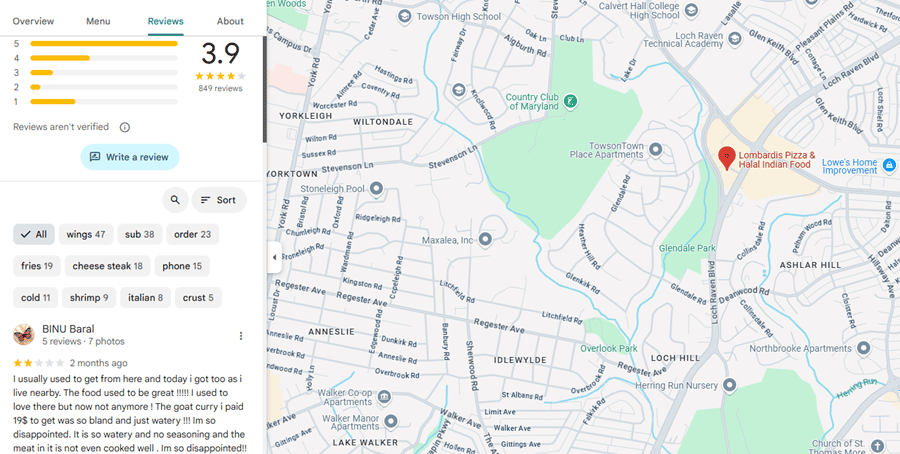
3. Locate the Problematic Review
Scroll through the reviews and identify the one you believe violates Google’s policies. Click on the three-dot menu (⋮) in the upper-right corner of that specific review.
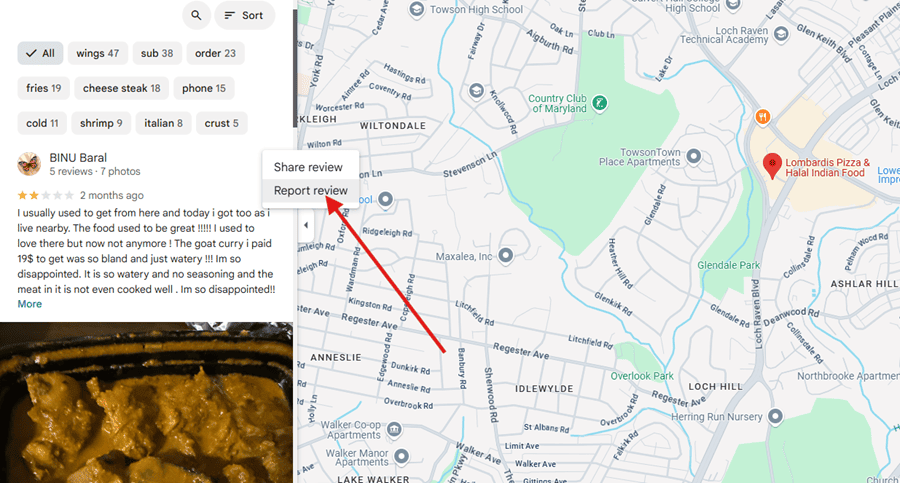
4. Report the Review
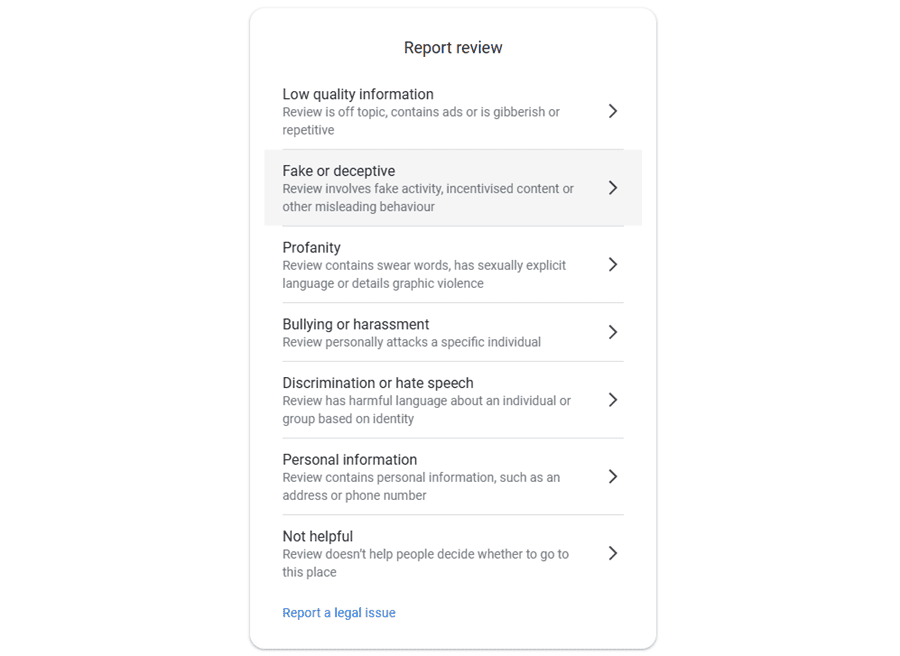
Select “Report review” You’ll be prompted to choose the reason that best describes the violation — such as spam, fake content, hate speech, or conflict of interest.
Be specific when prompted. Select the most accurate reason from the list, and if given the option to provide more details, explain clearly why the review is misleading, harmful, or in violation.
5. Monitor the Review Status
After submission, the review enters Google’s internal moderation queue. This can take anywhere from 3 to 10 business days. Google does not always send notifications about the outcome, so it’s best to revisit the review section regularly to track progress.
To stay on top of review status changes, consider adding a recurring calendar reminder to check back. If it’s not removed after 10 days, move to escalation.
What If Google Doesn’t Take Action?
If the review remains live and you’re confident it violates policy, escalate the issue:
- Use the GBP Help Portal: Visit the Google Business Profile Help center and submit a more detailed request.
- Contact Support: You can request a callback or start a live chat with Google support from within your dashboard under the "Support" tab.
- Leverage the Community Forums: Go to the GBP Community Forums and post your case. Google Product Experts sometimes escalate issues.
For critical or repeated violations (e.g., coordinated spam attacks), document everything — screenshots, user profiles, review timestamps, and present it clearly when contacting support.
What to Do When a Review Is Legit — But Negative
Some negative reviews are real. They're from real customers, and Google won’t remove them. Here's how to neutralize the damage:
1. Respond: But Stay Cool
Avoid reacting emotionally. Respond publicly within 24–48 hours to show professionalism and care. Acknowledge the concern, thank them for the feedback, and express your intent to resolve it.
Example:"Hi [Name], thank you for your feedback. We’re sorry to hear about your experience. We'd love to make things right, please contact us directly at [email]."
Even when a review feels unfair, being polite and respectful in your reply can win over future readers.
2. Investigate Internally
- Identify if the issue was a one-time occurrence or a recurring pattern.
- Verify if the reviewer was a legitimate customer by checking records.
- Review internal communications, transaction logs, or service notes.
Document your findings. If the review is discussed in team meetings or escalated internally, these records help track trends and demonstrate good faith.
3. Offer a Private Resolution
Reach out directly to the reviewer if possible. Even small gestures can make a big difference:
- Issue a refund or provide a credit toward a future purchase
- Redeliver the service or offer a follow-up appointment
- Send a personalized apology without excuses or justifications
The goal is to show that you value their feedback and want to make things right.
4. Politely Request an Update
Once the issue is resolved, ask the customer if they’d consider updating or editing their review. Phrase it as a voluntary request — never bribe, pressure, or offer incentives.
For example:
"We’re glad we were able to resolve the issue. If you feel comfortable updating your review to reflect your full experience, we’d appreciate it."
5. Keep the Good Reviews Flowing
Proactively build positive review volume to dilute occasional negative ones:
- Include review prompts in post-purchase emails
- Display QR codes at checkout counters or service desks
- Automate follow-up requests through your CRM or SMS tools
Consistent, high-quality service paired with smart review generation strategies will naturally improve your online reputation over time.
Pro Tips for Preventing Bad Reviews
While it’s important to know how to dispute a Google review when damage is already done, it’s far more effective to prevent negative feedback in the first place. A proactive approach to customer service, expectation setting, and internal processes can significantly reduce the number of complaints, and make your online reputation much easier to manage.
Underpromise, Overdeliver
Avoid overcommitting on timelines or features, especially in high-pressure sales. When customers feel pleasantly surprised by faster delivery or better results, their satisfaction increases — and their likelihood of leaving a positive review grows.
Clarify Expectations
Clearly communicate what your product or service does, and doesn’t - include. Use onboarding materials, FAQs, and pricing transparency to reduce ambiguity and prevent misunderstandings that lead to negative feedback.
Monitor Mentions
Set up tools like Google Alerts, ReviewTrackers, or BirdEye to be notified instantly when your business is mentioned or reviewed. Real-time awareness enables you to address issues before they escalate and to jump in with quick, visible responses.
Empower Your Frontline Staff
Train your customer-facing team to proactively resolve issues before they become public. Give them the tools, authority, and support to de-escalate situations and deliver excellent service because satisfied customers don’t leave 1-star reviews.
Recommended Tools for Monitoring, Flagging, and Managing Google Reviews
When your reputation lives on a public platform you don’t control, you need tools that give you leverage. Manual review tracking isn’t sustainable — especially if your business operates across multiple locations, products, or teams. You need visibility, speed, and structure.
Smart review management software helps you catch fake or harmful reviews faster, respond before issues snowball, and centralize customer feedback in one dashboard. These tools aren’t just for PR teams — they’re essential for anyone serious about protecting local SEO performance and online trust.
For example, BirdEye and ReviewTrackers offer real-time alerts and sentiment scoring, helping you pinpoint damaging patterns or coordinated spam attacks. Tools like Whitespark go deeper into local ranking factors — showing how reviews impact your position in the Map Pack. Even a free setup like Google Alerts can make a difference if you don’t yet have a paid solution.
If you're regularly dealing with misleading or reputation-threatening reviews, having this stack in place means you won’t miss signals that could cost you clicks, calls, or revenue.
Here’s a breakdown of the best tools available in 2025 to help you manage, dispute, and de-escalate harmful Google reviews at scale:
| Tool | Key Features | Monthly Price Range |
| BirdEye | Multi-site monitoring, review response templates, AI sentiment analysis | $299–$399+ |
| Whitespark | Local citation management, review tracking, competitive local SEO insights | $25–$100 |
| ReviewTrackers | Team workflows, trend reports, sentiment alerts, CRM integrations | $110–$200+ |
| Google Alerts | Basic brand mention tracking across indexed web pages | Free |
| Trustpilot | Review invitations, analytics, trust widgets, automated moderation | $125–$400+ |
FAQ: Removing Google Reviews
❓Can I delete a bad Google review myself?
No, unless you’re the original author.
❓Will Google remove a review if it’s just negative?
No. Only policy violations are removable.
❓How long does removal take?
Anywhere from 3 to 10 business days, sometimes longer.
❓Should I respond to fake reviews?
Yes, but briefly. Clarify the inaccuracy and note that you’re reporting it.
❓Can I sue someone over a false review?
In extreme cases (defamation, libel), yes, but consult legal counsel.
❓Can I remove reviews from Google if they seem fake but don’t clearly break policy?
It depends. If the review appears suspicious but doesn’t meet removal criteria, your best option is to respond calmly, document the context, and escalate through Google’s support if needed.
Final Thoughts: You Can't Control Everything — But You Can Own the Response
You won’t avoid criticism entirely — but you can choose how your business reacts and evolves from it. If you respond to negative reviews with transparency and genuine intent, people will notice — and trust you more for it.
Need help managing your online reputation at scale? Consider working with an experienced digital agency that handles local SEO, Google Business Profiles, and review management.
You don’t need perfect stars — just a real, visible response to criticism that shows you care.